Back to blog
Releases
Release: the Dispoly app for iPhone is in the App Store
Dispoly TeamReleases
End the booking chaos today.
30-day free trial. No credit card required.
Releases
30-day free trial. No credit card required.
Until now Dispoly ran in the browser. That stays: setup still happens on the web, and guests still don't need to install anything. Starting today there is also the Dispoly app for iPhone, free in the App Store and on every plan. It is built for the moments when nobody is at a desk: a request comes in while you are out, someone is standing at the van with the key, or a guest scans the QR code on the sign.
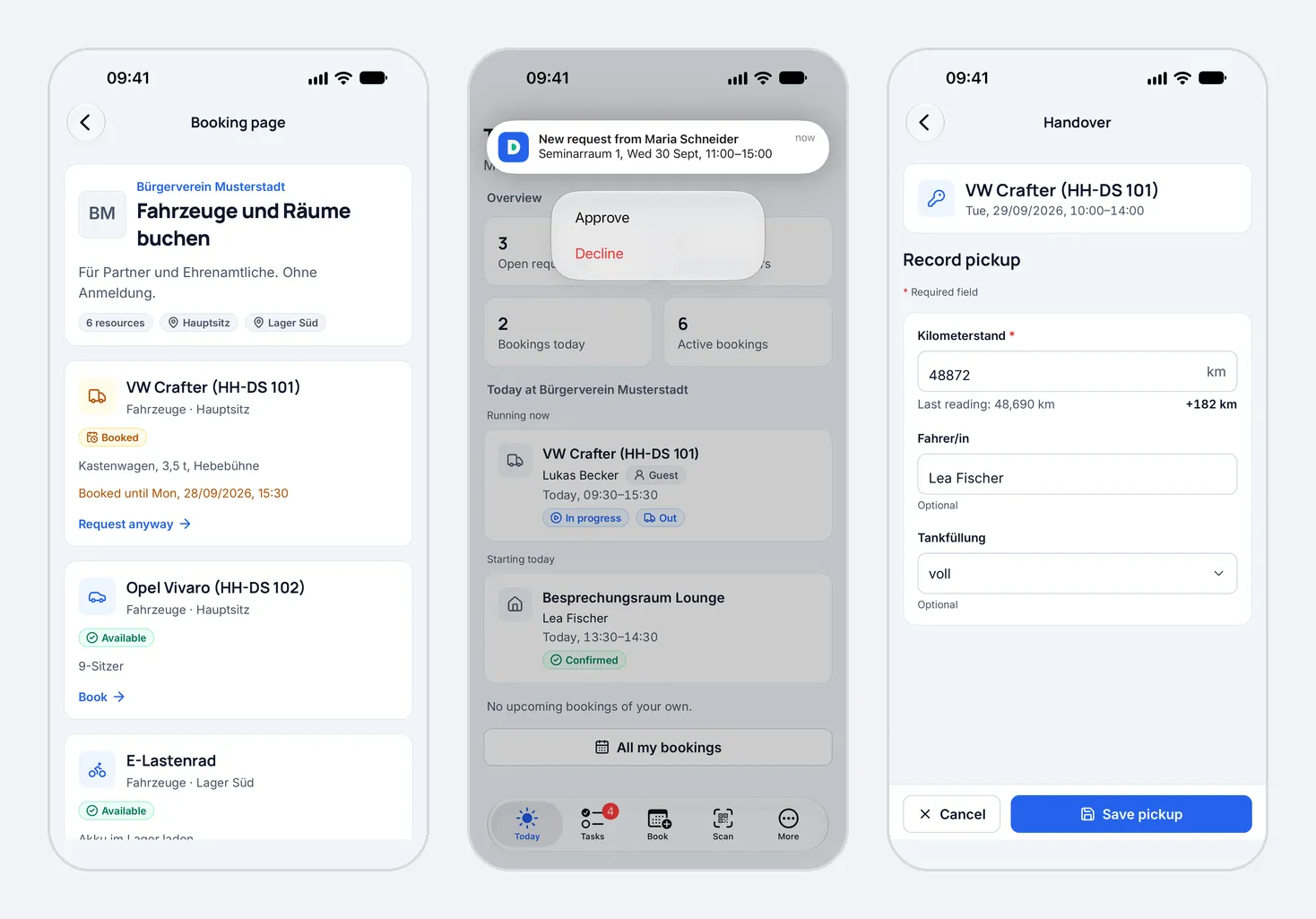
The app knows three roles. What someone sees depends on whether they book as a guest or sign in with an account, and on their role in the organisation.
Guests open a booking page from a link or scan the QR code in the "Scan" tab. Anyone who received a link by email or messenger pastes it under "Paste link". From there it works like the browser: pick a resource and a time, enter the details, send. If the organisation asks for email confirmation, the code arrives by email. If online payment is set up, the guest pays through Stripe.
The "Bookings" tab lists every booking made or opened on this device with its current status. If the organisation allows cancelling, that works there too. On request, the app sends a notification once a request is approved.
If the resource has pickup & return set up, the guest records both in the app, with meter readings and the fields you defined. Without a connection the draft is kept and sent once the device is back online, which helps in underground car parks and depots with poor reception.
Members sign in with the account their organisation invited. The "Today" tab shows their next bookings and the handovers that are due. Under "Book" they find resources by category and location.
Members record pickup and return from the booking or with the QR sign on the vehicle or device. The odometer is prefilled with the last known reading, and at return the difference updates as they type, just like on the web.
Admins get the "Tasks" tab with every open request. Approving takes one tap; declining asks for a reason, which the requester receives with the decline. Under "Today" admins see what is running, what starts today and which returns are missing. They can send a reminder about a missing return from the app.
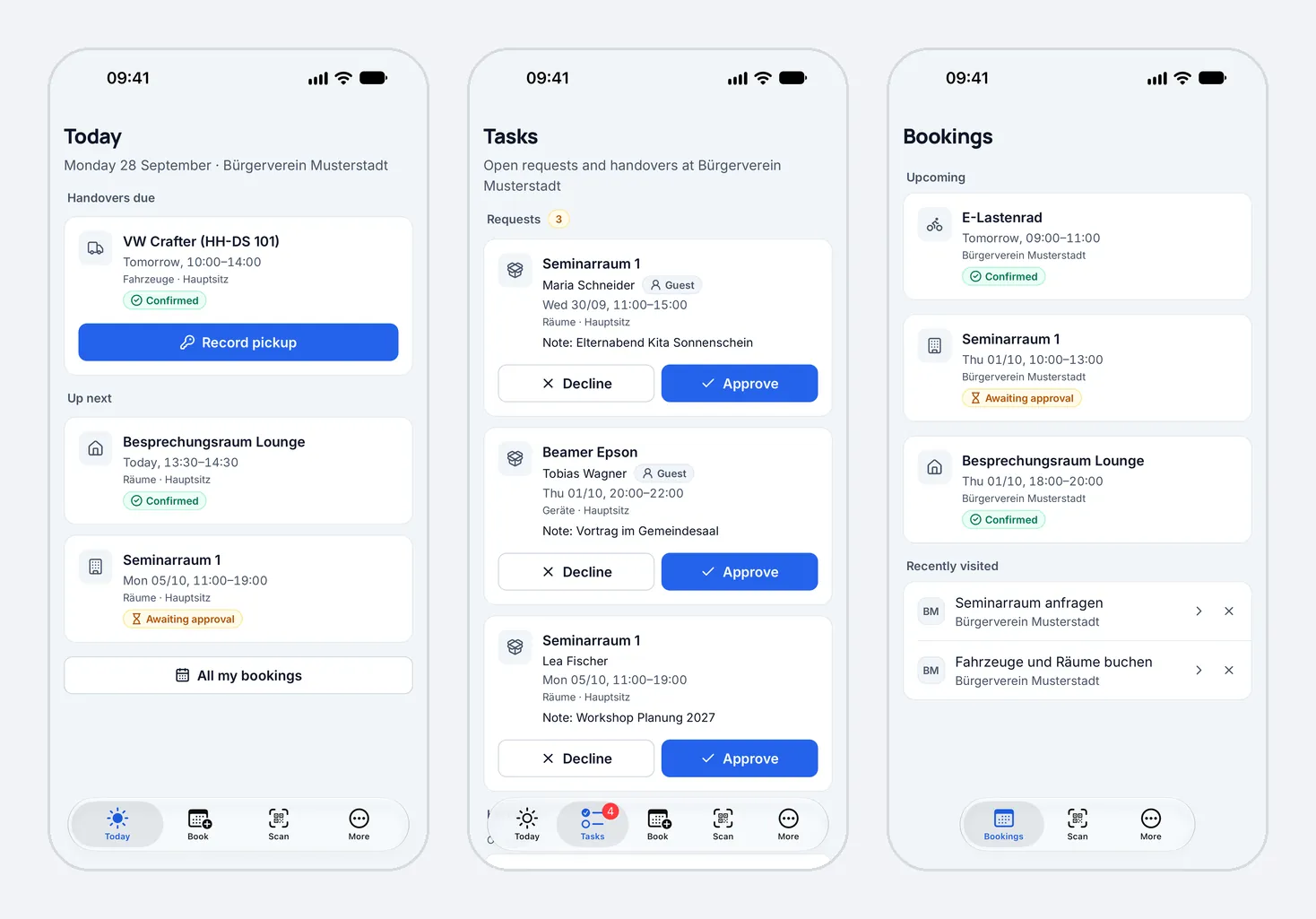
The biggest time saver is the "New request" notification. Press and hold it, and "Approve" and "Decline" appear, so you decide without opening the app. iOS asks you to unlock first, so nobody approves from the lock screen. Only admins of an active organisation get these actions. If the time slot now overlaps another booking, the app does not approve and tells you why.
Dispoly only sends notifications about bookings, requests, payments and handovers, never marketing. Admins hear about new requests, cancellations, payment problems and missing returns; members about their own bookings. Under "More" → "Notifications" each kind can be switched off on its own. Notifications to admins name who booked. Email addresses and notes never appear in them.
Nothing, unless you want it to. Accounts, resources and booking pages stay as they are, and the app works with the same data. Your links and QR codes keep working. With the app installed, links to booking pages and handovers open straight in the app; otherwise they open in the browser as before.
To roll the app out to your team, a short message to your members with the App Store link is enough. They sign in with their existing account, including Sign in with Apple or Google.
The app is available in German and English, in light and dark mode, and follows the device language.
Not using Dispoly yet? Set up your resources on the web, share the booking link and get the app for yourself and your team. Trying it out costs nothing: no contract, no setup fee, free for 30 days.